
How to Disable Login Hints in WordPress Login Error Messages
Recently, one of our users asked us how they can disable login hints in WordPress. By default, WordPress show error messages when someone enters incorrect username or password on the login page. These error messages can be used as a hint to guess a username, user email address, or password. In this article, we will show you how to disable login hints in WordPress login error messages.
What Are Login Hints in WordPress Login Error Messages
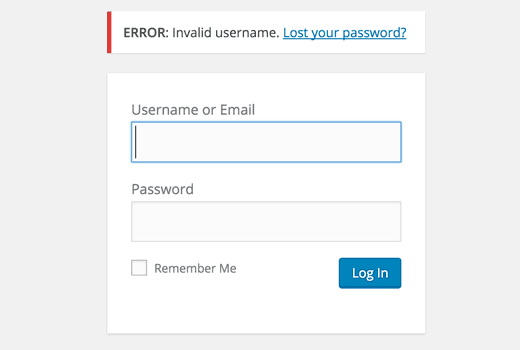
During login, WordPress shows this error message when a user enters incorrect username
ERROR: Invalid username. Lost your password?
If someone enters correct username with wrong password, then WordPress shows this message:
ERROR: The password you entered for the username johnsmith is incorrect. Lost your password?
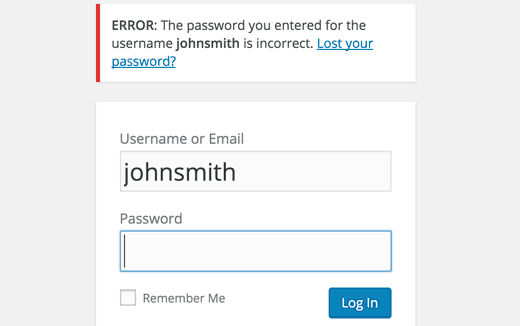
If someone is trying to guess your username, then this error message confirms that they have successfully guessed it.
Since WordPress 4.5, you can also login to your WordPress site using email address instead of username. These login hints can also confirm that you are using a particular email address for your admin account.
For most WordPress users this is probably not a big issue. But for people who are cautious about privacy and security, this could be a problematic thing.
For better security, you should always use unique usernames and strong passwords for your admin account. See our guide on the best way to manage passwords for WordPress beginners.
Having said that, let’s take a look at how to hide these login hints in WordPress login error messages.
To make it easy, we have created a video tutorial on how to disable login hints in WordPress login error messages.
However if you just want to follow text-instructions, then you can follow our step by step tutorial on how to disable login hints in WordPress login error messages.
Hiding Login Hints in WordPress
Simply add the following code to your theme’s functions.php file or a site-specific plugin.
function no_wordpress_errors(){ return 'Something is wrong!'; } add_filter( 'login_errors', 'no_wordpress_errors' );
This code adds your custom message as a filter to login errors. This will override default WordPress login errors.
Now if someone enters incorrect username, password, or email, WordPress would simply show the error ‘Something is wrong’ without giving any hints.
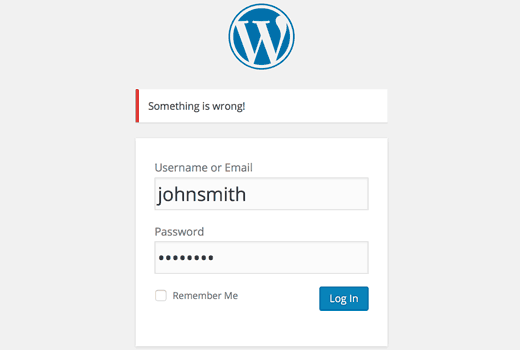
While this code can hide login errors, it cannot save you from more sophisticated hacking attempts or brute force attacks.
We use Sucuri to protect all our websites against common security threats. Sucuri comes with a website firewall that can block any suspicious activity from reaching to your site. See how sucuri helped us block 450,000 WordPress attacks in 3 months
We hope this article helped you hide login hints from WordPress login error messages. You may also want to see these on 13 tips and hacks to protect your WordPress admin area.
If you liked this article, then please subscribe to our YouTube Channel for WordPress video tutorials. You can also find us on Twitter and Facebook.
